
Memory Enhancer - Nikon Super Coolscan 4000 ED Review

Unless your end goal is building your own dark room, spending several hundred dollars on increasingly niche chemicals so you can have the right to mutter about silver halide like it's 1978, those negatives still eventually need to become files. The easiest answer is simply paying the lab to scan them along with development, and there's absolutely nothing wrong with that.
The problem is that this also means surrendering a pretty significant part of the workflow to somebody else.
 |
| A Fujifilm Frontier SP3000 lab scanner. |
The hard truth of the matter is; the typical lab scanning workflow for film negatives does not give you anywhere near the kind of freedom afforded by having all your files available the instant you push the shutter release on a digital camera.
Scan resolution, sharpening, color conversion, dust removal, compression and whatever other processing the lab applies are now baked into whatever files you get back. If you don't like the result, you either work around it or pay to have the film scanned again.
So naturally, instead of doing the sensible thing and letting somebody else deal with all this shit, I bought a 25-year-old professional Nikon film scanner.

This device is the Nikon Super Coolscan 4000 ED, otherwise known as the LS-4000.
Make no mistake; this was not some rinky-dink plastic contraption intended for scanning grandma's vacation slides once every Christmas. When it was introduced in 2001, the LS-4000 retailed for $1,695 and was explicitly aimed at professional photographers, graphic artists, publishers and scanning services that needed to chew through 35mm film quickly and at very high quality.
Flash forward to present day, and I paid $489 for my complete-in-box example before tax and shipping - and just wait until you see what that gets you.
The headline specification was a true optical resolution of 4000 DPI through a dedicated auto-focusing Scanner Nikkor ED lens, backed by 14-bit-per-channel capture and a quoted density range of 4.2. A full 35mm frame scanned at maximum resolution ends up somewhere around 5700 x 3800 pixels depending on the exact crop, or roughly 21 to 22 megapixels worth of file.
Obviously, that doesn't magically mean every piece of 35mm film contains precisely 22 megapixels of useful photographic information. Film stock, grain, lens quality, focus and exposure all get a vote. But what it does mean is that the Nikon can scan deeply enough that the limiting factor very quickly becomes the photograph itself rather than some obviously inadequate scanner.
 |
| Nikon F4S - AF Nikkor 50mm f/1.8 - Kodak Ultramax 400 |
And holy shit does this thing resolve detail.
Even relatively grainy consumer stocks like Kodak Ultramax 400 come out looking remarkably convincing at 4000 DPI. Fine texture survives, edges remain crisp without needing me to crank sharpening through the roof, and the scans have enough resolution that I can treat them much like photographs coming straight out of a digital camera.
I get a big, detailed TIFF file that can go straight into my normal editing workflow. I can adjust exposure, color, contrast and crop it exactly how I would anything coming out of one of my digital cameras. The scanner isn't trying to reinvent the photograph. It's just doing an extremely good job getting what's physically on the negative into the computer.
In my own workflow, I haven't even found much reason to enable sharpening, grain reduction or most of the other enhancement features available in the software. The basic full resolution scan already gives me more than enough material to work with.
 |
| Probably taken around the year 2000 on some little Nikon point-and-shoot. I have never seen this picture look like this, ever. |
But the real killer feature isn't even the resolution. It's the infrared channel.
Nikon originally sold the LS-4000 with Digital ICE 3, which uses an infrared scan of the film to identify physical defects such as dust and scratches independently from the actual image. Since I'm running the scanner through VueScan rather than Nikon's ancient original software, VueScan performs its own version of the same basic trick under the wonderfully descriptive name "Infrared Clean" - and it feels like fucking witchcraft.
Even just set to 'Light', the infrared cleaning removes the overwhelming majority of little dust spots and minor scratches from my color negatives without forcing me to spend the next twenty minutes cloning microscopic debris out of the sky in Photoshop.
For the relatively clean negatives I get back from the lab and immediately sleeve, I've honestly stopped seeing much reason to obsessively clean every strip before scanning it. I'll still blow off anything obviously dirty - partly because feeding actual dirt into the scanner is probably a terrible long-term maintenance strategy - but the Nikon can deal with normal incidental dust so effectively that elaborate pre-cleaning simply isn't worth the effort for me.
Dirtier or damaged negatives may justify turning the correction up. Even then, you're starting from automatic cleanup rather than manually repairing every speck afterward. That is no small amount of time and labor saved.
 |
| Nikon F4S - AF Nikkor 50mm f/1.8 - Kodak Ultramax 400 |
There is one enormous caveat: infrared cleaning isn't universally compatible with film.
Traditional silver-based black-and-white emulsions don't work properly because the silver itself interferes with the infrared defect map. Nikon also specifically did not recommend Digital ICE with Kodachrome on the LS-4000 generation. So if your diet consists largely of Tri-X and ancient Kodachrome slides, congratulations: the dust brush has regained employment.
 |
| Konica Autoreflex T3 - Hexanon AR 50mm f/1.4 - Kodak Ultramax 400 |
The other thing that immediately separates the Nikon from a lot of old - and even some newer dedicated scanners is that it gets shit done.
Nikon originally quoted roughly 38 seconds for a full-resolution 4000 DPI scan with the fancy processing
disabled, and even today the LS-4000 feels properly fast. Independent contemporary testing put
uncomplicated scans in roughly that same range, while enabling infrared cleanup approximately doubled or tripled the process depending on software and hardware.
That's still quick enough that I've developed the opposite problem I expected from film scanning: I can't really walk away.
 |
| Konica Autoreflex T3 - Hexanon AR 50mm f/1.4 - Kodak Ultramax 400 |
With something like a Canon FS4000US or the original Minolta Elite 5400 running their heavier correction routines, you can start a high-resolution scan and go make coffee, file your taxes or raise a child. The Nikon gets through strips quickly enough that I spend more time nearby feeding it the next batch.
This is admittedly an incredibly privileged complaint.
"Aw shit, my 25-year-old professional film scanner is processing negatives too quickly for me to comfortably ignore it. What the hell am I going to do?"
Here's an idea: reconfigure the feed system of the whole entire machine to suit your workflow.
 |
| The SA-21 automatic strip feeder. |
This is the thing that makes Nikon scanners - especially the Super Coolscan models - stand out among so much of their competition. It's not just the scan speed: it's what you can bolt onto the machine to turn that speed into raw throughput.
Nikon typically included it's two consumer geared Coolscan adapters with the LS-4000: the SA-21 and the MA-20. The SA-21 adapter accepts 35mm strips up to six frames in length, while the MA-20 takes single mounted slides. The workflow between the two of them is delightfully simple.
With the MA-20 you just pop a slide into it, scan, then eject and repeat. The SA-21 is significantly more automated: you just feed the scanner a strip up to six frames in length, let the software index them, and then it automatically handles the positioning of each frame for final scanning.
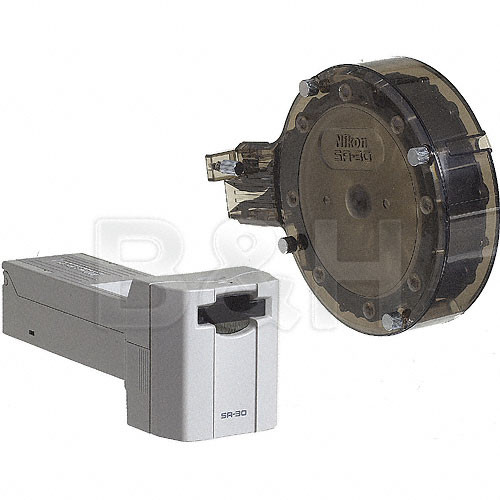 |
| The SA-30 feeder and accompanying rear collection drum. Source: B&H Photo |
But remember; Nikon also designed the LS-4000 with much heavier professional use in mind. The more exotic professional adapters are even more capable: the SA-30 roll adapter can feed an uncut roll of up to 40 frames, while the SF-200 slide feeder could chew through around 50 mounted slides unattended.
The LS-4000 also supports multi-sample scanning, where the scanner repeatedly reads the same frame and combines the results to reduce scanner noise - potentially useful for especially difficult dense transparencies, although wildly unnecessary for most of the color negatives I've been throwing through mine.
There are autofocus controls, manual focus adjustment, film-position offsets and enough other professional workflow crap here that you can make scanning as complicated as you desire. I mostly don't, and the fact I can ignore most of the expensive professional features and still get the results I do is honestly part of why I like it.
If this all sounds weirdly perfect, don't fret - there's one big catch, and it's on the back of the machine.

There is no USB, no SCSI fallback, or no secret Ethernet port behind a flap. If you want to scan something, your computer needs to communicate over IEEE-1394.
In Nikon's defense, this wasn't some brain-dead interface choice in 2001. FireWire was a legitimate high-speed connection interface and exactly the sort of thing you'd expect on equipment intended to move many large image files as quickly as possible.
Twenty-five years later, however, this has become the scanner's single biggest pain in the ass - but at least it's not SCSI.
 |
| A PCIe card like this is readily available on Amazon or eBay and costs relatively little. |
There are basically three sane-ish approaches.
If you have a desktop with a free PCIe slot, just install a FireWire card. This is by far the cheapest and least stupid modern solution. Windows still understands IEEE-1394 hardware perfectly well once the controller is present, and you're not building a chain of increasingly expensive discontinued Apple dongles across the room.
Alternatively, use an old computer. Plenty of PowerPC Macs, early Intel Macs and period PCs have native
FireWire 400, and machines old enough to include it tend to cost approximately twelve dollars and
somebody's desire to get them out of the garage. For a dedicated scanning station, that's honestly not a
terrible solution.
And then there is the 'Apple Dongle Totem Pole'.

If you have a more modern device equipped with Thunderbolt, the interface communicates perfectly well with FireWire devices so long as you have the appropriate adapters, and Apple made everything you'd need to make it happen. On a proper Thunderbolt 3 machine, a working chain looks like:
LS-4000 → FireWire 400-to-800 cable → Apple Thunderbolt-to-FireWire adapter → Apple Thunderbolt 3-to-Thunderbolt 2 adapter → computer.
It looks like something an IT department would produce as evidence during a workplace negligence
investigation - but it works.
Unfortunately, it's also really expensive to implement nowadays because genuine Apple TB-to-FW adapters now sell in roughly the $100 to $200 bracket depending on condition. I was lucky enough that my particular scanner came with all those components - including the TB-to-FW adapter, but that stupid dongle is expensive enough to where a whole-ass mid-2000s laptop starts looking like the more financially sensible option.
You also might ask; "I have USB4. Doesn't USB4 support Thunderbolt?"
And you'd be right to ask that. I asked the same thing, and it turns out there is an important difference between a USB-C port that happens to support USB4 and an actual Thunderbolt implementation.
USB4 incorporates compatibility with Thunderbolt 3 devices, but that does not mean every USB4 controller is guaranteed to successfully tunnel its way backward through Apple's Thunderbolt 3-to-2 adapter and then through another adapter into FireWire. The legacy chain depends heavily on the host controller, firmware, operating system and actual Thunderbolt support. USB-IF only specifies compatibility with Thunderbolt 3 at that level; old Thunderbolt 1/2-to-FireWire arrangements are not some universal USB4 entitlement.
Neither of my USB4-equipped PC towers could see the scanner through the adapter chain, but my actual Thunderbolt-equipped Mac Pro could. That is enough practical experimentation for me.
 |
| Nikon Scan 4 - the software you'll only get to use if the stars align. |
Getting the cable connected and the device recognized also only gets you halfway through the graveyard.
Nikon Scan 4 has been abandoned for years and Nikon explicitly no longer distributes or supports it. Its official OS support predates modern Windows by several geological eras. You can force the old Nikon software to work on newer Windows installations through community drivers and compatibility hacks, but that road can involve unsigned drivers, temporarily disabling signature enforcement and occasionally fighting Secure Boot.
I tried this. Believe me, I really did - but I eventually remembered that I have other things to do before I kick the bucket.
Thankfully, both VueScan and SilverFast still support the LS-4000 on current operating systems and provide their own hardware support. VueScan can install its own Windows driver automatically, while SilverFast currently lists the LS-4000 as supported under Windows 11 and a wide range of recent macOS releases.
Unfortunately, keeping ancient professional hardware alive has apparently become a luxury software market of its own.
 |
| VueScan is my preferred way to go. It's also not cheap. |
VueScan requires its Professional edition for dedicated film-scanner features, and while it offers a perpetual license, a perpetual license isn't cheap at $199. SilverFast gets considerably sillier: its current LS-4000 page lists Ai Studio at $349.
To their credit, both packages are supporting hardware whose own manufacturer walked away from it years ago.
And to my credit, I am still allowed to bitch about paying hundreds of dollars for scanner software, of all things.

I eventually settled on the dumbest solution I could reliably make work without buying anything new.
My Mac Pro 7,1 runs Windows 11 and has genuine Thunderbolt ports, which means the entire Apple adapter centipede actually works. The machine also happens to live headless on a console in my game room, and this produced an unexpected advantage.
I can put the Coolscan beside the couch on a shelf, remote into the Mac Pro from my laptop, put a movie on the TV and comfortably feed negative strips into the scanner without spending an hour sitting hunched over a desk. It's a messy, but kickass setup.
It also required a once-$17,000 workstation, two discontinued Apple adapters, FireWire, remote desktop software and a third-party scanner application to achieve the revolutionary workflow of sitting on my ass
while feeding film into a box.
I have to admit, the newer USB-equipped Coolscan V suddenly looks pretty appealing.

And yet even once everything is working, the Coolscan periodically likes reminding me that it is still a scanner.
Every so often, VueScan will simply behave as though there is no film loaded. Removing and reinserting the strip doesn't help. Asking it to find the scanner again doesn't help. After enough trial and error, I discovered the sacred ritual:
Shut off scanner → tell VueScan to find scanners → turn scanner back on → wait for initialization → find scanners again.
If that doesn't work, repeat until the spirits are satisfied.
I have absolutely no idea why, but more often than not, it fixes the problem. Such is life with printing and scanning hardware, though I could only imagine the kind of hell I'd be going through if this was an HP product.
 |
| The internal mirror housing with it's retention clip partially removed. |
There is another small problem with recommending the LS-4000 in 2026: every single one of them is old enough to rent a car.
These are generally very well-made machines, but they're still packed with motors, gears, optical assemblies, sensors, electronics and moving film transports that have spent approximately a quarter-century waiting for entropy to notice them.
One particularly common maintenance item is the internal scanning mirror. Dust or haze on that surface can degrade contrast and color, cause scan lines and, in severe cases, even interfere with autofocus or the
scanner's startup self-test. There are extensive enthusiast guides for cleaning it because Nikon certainly isn't servicing these things anymore.
That does not mean I'd tear apart a perfectly working scanner the second it arrives. The mirror is an optical
surface, not a kitchen window. If scans look good, leave the poor thing alone.
Ideally, the scanner you buy simply works, and you do your best to verify that beforehand. Just don't approach a 25-year-old precision electromechanical device with the expectation that "powers on" means another twenty-five years of life are guaranteed.
 |
| The MA-20 slide adapter and FH-3 film strip holder. |
This is also one of those products where buying the cheapest naked unit can become incredibly expensive
very quickly. At the very minimum, look for bundles with adapters and know which ones you're getting.
If you just want to scan cut 35mm strips, the SA-21 strip-film adapter is basically non-negotiable, while the MA-20 slide adapter paired with the FH-3 film holder is nice to have. The FH-3 is useful for awkward, curled or unusually short film that the automatic SA-21 feeder can't handle. Ideally you try and get both.
Buy any of those individually and the "great deal" you got on the scanner can start reproducing invoices like rabbits. I would gladly spend more upfront on a tested unit that includes the adapters I actually need rather than save fifty bucks on a mysterious box with a power cord and then spend the next month hunting eBay for proprietary pieces of plastic.
These also aren't the only 35mm scanners on the planet though, and some of them are arguably more compelling than the LS-4000. They also have some very real drawbacks.

The Canon FS4000US is probably the most obvious bargain alternative in the roughly $100-300 range. It also offers 4000 DPI scanning, 14-bit-per-channel capture, a quoted 4.2 maximum density range and its own infrared FARE dust-removal system.
Unfortunately, that USB is USB 1.1 - and the scanner slow as fucking molasses.
I actually nearly owned an FS4000US instead of the LS-4000 - until the seller broke the damn thing while trying to pack it. In hindsight, he was probably doing me a favor. Practical tests have put 4000 DPI scans into the multi-minute range, especially with FARE processing enabled, versus roughly a minute or two for the Nikon depending on settings.
Still, image quality can be excellent, so if you're scanning a modest archive and patience is cheaper than Coolscan money, it's still a very compelling option.

Then there's the the Coolscan V ED / LS-50, which is arguably the smarter purchase if FireWire makes you want to walk directly into the ocean.
It gives you the same basic 4000 DPI resolution, 14-bit A/D conversion, 4.2 density specification, Scanner Nikkor ED optics and infrared cleanup hardware, but connects over ordinary USB 2.0. Nikon rated it at the same 38-second bare scan time.
What you lose are some of the LS-4000's professional workflow features. Nikon did not officially give the V multi-sample scanning, SA-30 whole-roll support or automated slide-feeder support. For somebody scanning ordinary six-frame strips at home, those omissions may be completely irrelevant.
Current prices overlap substantially too: recent LS-50 examples have sold in roughly the $450–725 range
depending on condition and accessories. If an LS-50 and LS-4000 are sitting in front of me for similar money and I don't already have a painless FireWire solution? I'm taking the V.
I enjoy suffering, but even I have limits.
 |
| The LS-5000 looks almost identical to the LS-50. It certainly is not. |
Then there's the Super Coolscan 5000 ED / LS-5000, which is essentially the fully evolved version of this idea.
It keeps 4000 DPI but moves to a faster two-line CCD, 16-bit A/D conversion, USB 2.0, newer ICE 4 processing and a Nikon-quoted full-resolution scan time of just 20 seconds. It also retains serious batch-workflow support like the SA-30 and slide feeders.
It is unquestionably the better scanner. Possibly the best film scanner ever made depending on who you ask and how enthusiastic they are about financial self harm - because it is also hilariously expensive.
Current asking prices for good working examples routinely climb well above $2,000, while usable LS-4000s commonly live around the several-hundred-dollar mark. The exact ratio moves around too much for me to definitively say, but two to four times the money is entirely plausible depending on condition and accessories.
If you're running thousands of frames through the thing, twenty seconds instead of thirty-eight quickly stops being trivia. Time is money, and this was exactly the professional workload Nikon built the LS-5000 for.
If you're scanning a few rolls of your own film while sitting on the couch? Absolutely the fuck not.
 |
| Source: sebastian-schlueter.com |
But by far the biggest elephant in the room is that you don't technically need a dedicated film scanner anymore.
A modern digital camera, decent macro lens, film carrier and uniform backlight can digitize a 35mm negative dramatically faster than the Coolscan. Once everything is aligned and focused, the actual capture takes approximately as long as pressing the shutter button. Use a sufficiently high-resolution body and you can even exceed the LS-4000's roughly 21–22 megapixel nominal output.
If you're scanning hundreds or thousands of frames, that capture-speed advantage is enormous - but "capture speed" and "workflow speed" are not necessarily the same thing.
 |
| Source: VALOI |
A camera-scanning setup needs the film held flat and square to the sensor, the camera positioned perfectly
perpendicular, magnification set correctly, a good macro lens, a suitable light source and some method of
preventing stray light from contaminating the image.
Then there's dust.
There is no infrared cleanup channel magically hiding inside your DSLR. Whatever dust you photograph is now part of the photograph, which means either getting the negative extremely clean beforehand or fixing the remaining garbage afterward.
 |
| The AF-D Micro-Nikkor 60mm would have been my low cost entry point to DSLR scanning. |
I still spent hours agonizing over this decision.
I already own a great DSLR, and a macro lens such as the AF-D Micro-Nikkor 60mm plus a decent film transport solution like the VALOI easy35 V2 were not substantially different in cost versus a dedicated scanner. It would be much faster, I'd get a genuinely usable macro lens out of the deal, and I wouldn't be rolling the dice on the longevity of a complex 25-year-old scanning device.
And yet the scanner was still the more appealing option to me.
The Nikon is much slower at physically acquiring the image, but is much faster at making the image my problem no longer - and that's the key argument.
I insert the strip, let the scanner autofocus, scan at 4000 DPI with infrared cleaning, and receive something that's at least most of the way toward being usable without ever needing to touch Photoshop or a duster.
Camera scanning can absolutely be faster. It simply deserves an enormous asterisk after the word "faster."

The Nikon Super Coolscan 4000 ED is one of the strangest pieces of obsolete hardware I've used, mostly because the part that actually scans film doesn't feel especially obsolete.
At 4000 DPI it extracts enough detail from 35mm to produce files that still feel completely at home in a modern photo workflow. The autofocus works. The automatic strip feeder works. Infrared cleanup borders on black magic. Scan times remain genuinely fast.
If I magically replaced the FireWire connector with USB-C and hid the manufacture date, very little about the actual scanning process would immediately tell me this thing came out in 2001.
Everything surrounding that process, however, absolutely will.
FireWire is a bastard to integrate into many modern systems. Nikon's software has been abandoned. Third-
party replacements can be expensive. Proprietary film adapters add up quickly if they're missing, and every scanner on the market is now old enough that internal maintenance is no longer some abstract future concern.
That's also precisely why the LS-4000 remains such an interesting value: its biggest weakness has almost nothing to do with how well it scans film.

The Coolscan V is much easier to live with. The LS-5000 is substantially faster. A modern camera-scanning rig can chew through negatives at a rate this thing will never touch.
But if you can solve the FireWire problem cheaply and find a complete, healthy example? The 4000 ED gives you most of the experience that made Nikon's later 35mm scanners legendary without paying the increasingly deranged prices attached to them.
Mine required a headless Mac Pro, Windows 11, VueScan and a tower of obsolete Apple dongles to get there. Once all that stupidity is out of the way, I feed it a negative and it spits out a beautiful photograph.
There's also something genuinely magical about seeing images from decades old cameras gradually come into view on your computer, or blowing up old family negatives on your TV with the kind of resolution that would have seemed illegal all those years ago. It's not just a tool for professional work or preservation - it's a memory enhancement device.
For twenty-five-year-old scanning hardware, that's really difficult to complain about, and it's a lot of fun using it to boot.
So keep quiet. If people figure this out, the prices will go up.
What's Good
- 4000 DPI extracts genuinely excellent detail from 35mm film.
- Infrared scratch and dust removal works spectacularly well.
- Fast operation with optional adapters for serious throughput.
- VueScan and SilverFast keep it alive on modern operating systems.
- FireWire 400. Good fucking luck.
- Third party dongles and software can cost an absurd percentage of the scanner itself.
- Infrared dust removal doesn't work with black and white film.
- Every example is now roughly a quarter-century old.


Comments
Post a Comment